
Built-in UI tools in WoW Forever: what replaces WeakAuras
WoW Forever has the same addon restrictions as the modern game since Midnight. Addons see less and can do less in combat, and WeakAuras no longer works. In return the game has several tools built in: a Cooldown Manager, a Damage Meter, a Swing Timer, Edit Mode and Click Casting. This guide shows where to turn each one on.
| WeakAuras | Does not work in Forever |
| Where to start | Options, Advanced Options |
| Built in | Cooldown Manager, Damage Meter, Swing Timer, Edit Mode, Click Casting |
| Placing things | Edit Mode, from the Escape menu |
| Addons | Still allowed, if made for Forever |
Cooldown Manager
The Cooldown Manager is the closest thing to WeakAuras. It reads your buffs and action bars and shows the spells you choose in a frame of its own. Trinkets and potions can be tracked too.
- Open the game menu and choose Options.
- Go to Advanced Options.
- Tick Enable Cooldown Manager. It is off by default.
- Open Edit Mode to place it.
- Type /cdm to choose which spells appear.
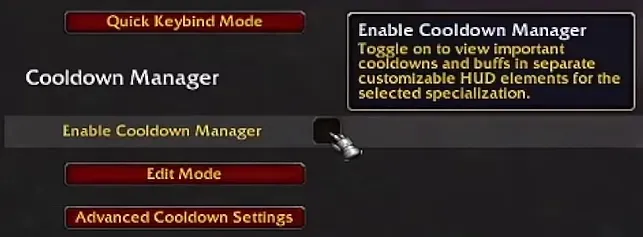
It does not replace everything. Custom triggers, advanced combat tracking and help with your rotation are not possible under the new rules. It shows the information that matters most, and that is it.
Damage Meter
No addon needed for basic combat statistics.
- Open the game menu and choose Options.
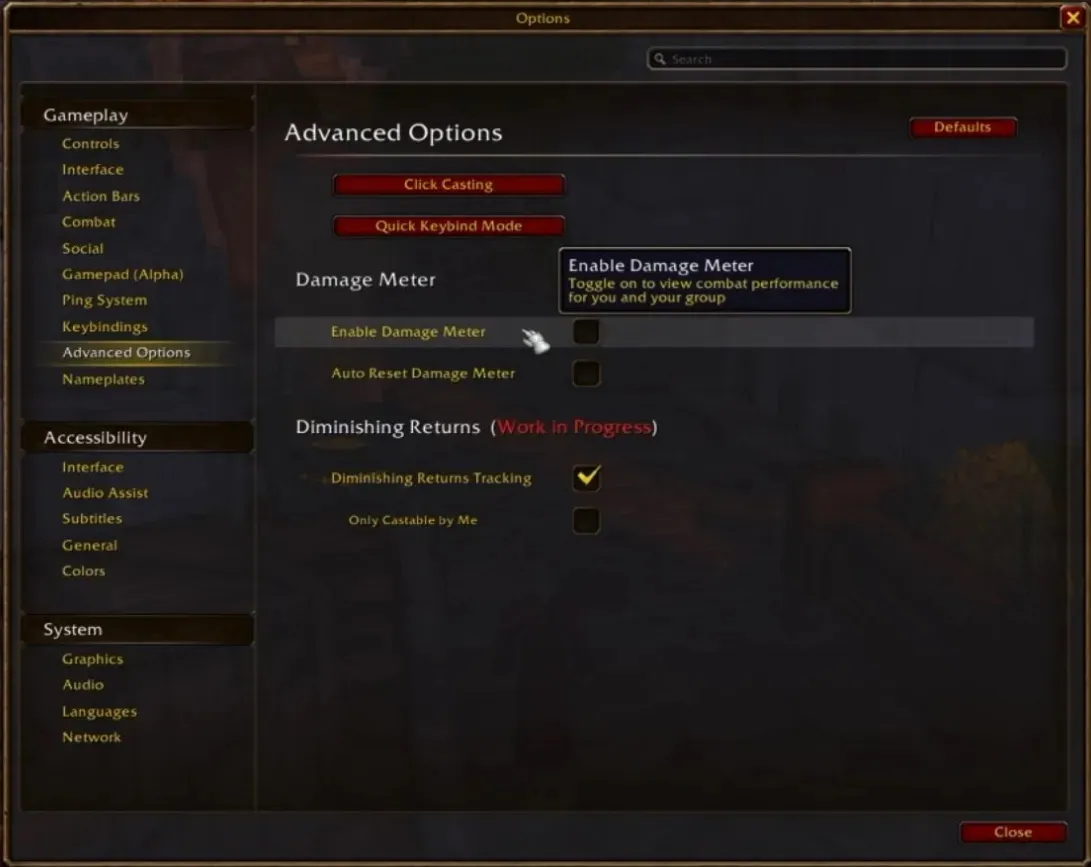
- Go to Advanced Options, section Damage Meter.
- Tick Enable Damage Meter. Auto Reset Damage Meter clears it for you.
- Open Edit Mode to move and resize it.
The dropdown on the meter itself chooses what it shows. The gear icon resets the data, changes the display and opens extra meter windows.
Swing Timer
The built-in Swing Timer shows when your next auto attack lands, handy to time abilities around your weapon swings. Turn it on in the same Advanced Options and place it with Edit Mode.

Edit Mode
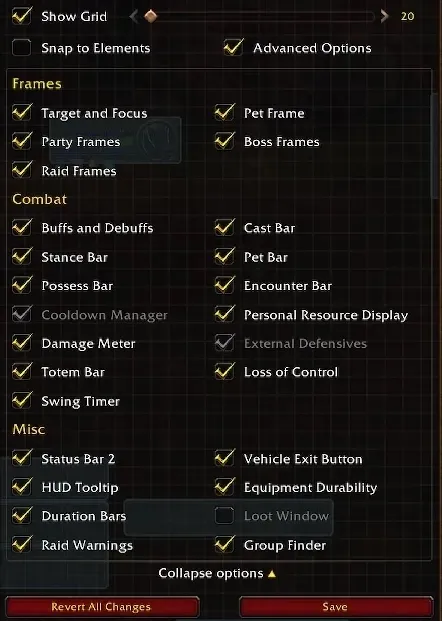
Edit Mode lays out your interface. Open it from the Escape menu. Besides the Cooldown Manager, Damage Meter and Swing Timer, it moves frames such as party and raid frames, the cast bar, the totem bar, buffs and debuffs, Loss of Control and the Personal Resource Display.
Click Casting and mouseover
Click Casting binds spells to mouse clicks or key combinations on your unit frames, so you heal or help a party member without targeting them first. Set it up under Click Casting in the Key Bindings menu, or with the Click Casting button in Advanced Options. The window also has a Mouseover Cast box.
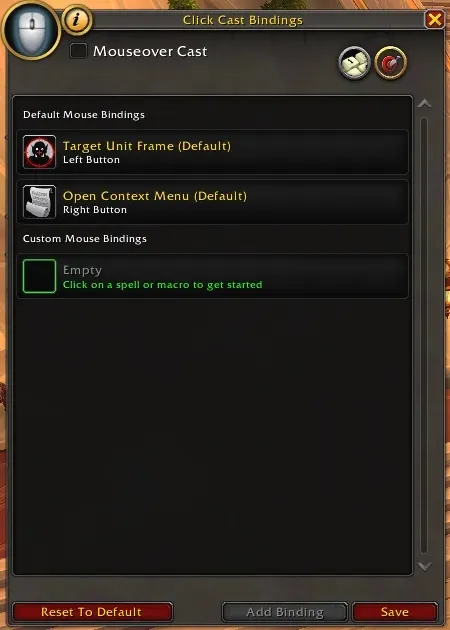
Mouseover casting for all your spells is under Options, Combat: your spells then go to the unit under your mouse while you keep your own target. More in our healer guides, such as Restoration Shaman.
Which addons still work
Forever does not ban addons. The rules limit how addons read combat information and react to protected data, as in the modern game. Addons for the interface, bags, action bars and other conveniences still work, as long as they are compatible with Forever.
- Old Classic addons are not guaranteed to work. Look for a version marked for WoW Forever.
- Check the game first. The Cooldown Manager, Damage Meter, Swing Timer and Click Casting cover a lot of what players used addons for.
- Leveling guides run as addons too. Which one fits you is in our comparison of leveling addons.
Frequently asked questions
Does WeakAuras work in WoW Forever?
No. Forever uses the same addon restrictions as the modern game since Midnight, which limit what addons can see and do in combat. WeakAuras cannot work under those rules.
What replaces WeakAuras in WoW Forever?
Partly the Cooldown Manager, built into the game. It shows the spells, buffs, trinkets and potions you choose in its own frame. Custom triggers, advanced combat tracking and rotation help are not possible.
How do I turn on the Cooldown Manager?
Options, Advanced Options, tick Enable Cooldown Manager. Move it in Edit Mode and type /cdm to choose which spells it shows. It is off by default.
Is there a damage meter in WoW Forever?
Yes, built in. Turn it on in Options, Advanced Options, Enable Damage Meter, and place it with Edit Mode. A dropdown on the meter picks what it shows.
Do addons still work in WoW Forever?
Yes, as long as they are made for Forever. Addons for the interface, bags and action bars still have a place. Old Classic addons are not guaranteed to work, so look for a version marked for WoW Forever.